Make your files mini — 100% private
Drop files or click to choose
100% local private compression. Files never leave your device.
How it works
Compress or password-protect your files in three simple steps. No account required.
Traditional Cloud compression
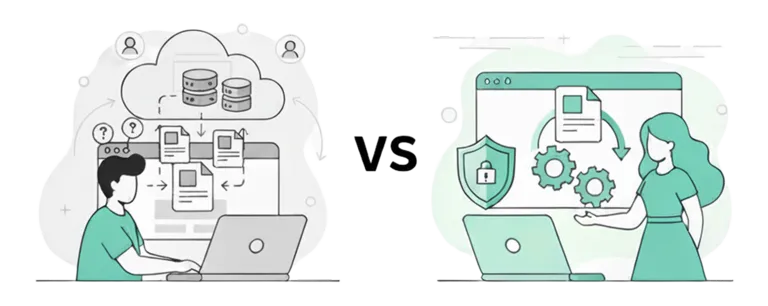
Private In-Browser Compression
Traditional Cloud compression
Private In-Browser Compression & Protection
Why use MiniFiles?
The fastest, most private way to compress and protect your files. No uploads, no limits, no compromise.
How we compare
See why MiniFiles is the best choice for compressing and protecting your files.
| Features | MiniFiles.io | Squoosh | iLoveIMG | TinyPNG | Compressor.io |
|---|---|---|---|---|---|
Limits | Unlimited | 1 image | ≈60 images | 20 images/5 MB each | 10 images/10 MB each |
Compression Speed | Very Fast | Very Fast | Slow–Medium | Slow | Slow |
No Server Required | |||||
100% Local Processing | |||||
Batch Processing | |||||
Auto Resize | |||||
WebP Conversion | |||||
Zero Carbon Emission | |||||
PDF Password Protection |
Built for organisations that handle sensitive documents
MiniFiles processes everything locally — no cloud uploads, no file retention. That makes it uniquely suited for law firms, clinics, and compliance teams working with confidential PDFs and client data.
Zero data retention
Files are processed entirely in the browser via WebAssembly — they never touch our servers.
Privacy-by-design
No uploads, no cloud processing. Your data stays on your device at every step.
PDF password protection
Add 256-bit AES owner + user passwords locally — ideal for confidential legal and medical documents.
Enterprise contracts
DPA (GDPR Art. 28), data-flow documentation for compliance reviews, priority support, PO/wire invoicing — available on Business & Enterprise plans.
Ready to discuss your team's needs?
Get a DPA, volume pricing, and dedicated support — no commitment needed.
Simple, transparent pricing
Try every tool 10 times a day with no account, or sign up free to remove the daily limit.
Uploading documents to third-party tools creates regulatory risk
Every file processed on an external server is a potential data transfer without a DPA — a GDPR Article 28 violation. MiniFiles runs entirely on your device. Nothing leaves your browser.
GDPR · EU & EEA
€20M
or 4% of global turnover
HIPAA · US Healthcare
$1.9M
per violation category / year
CCPA / CPRA · California
$7,500
per intentional violation
Business & Enterprise plans include a signed DPA, and our data-flow documentation shows exactly what leaves the browser — so your legal team can review it.
See real fines & how to avoid themFree
Create a free account — unlimited files
No account? 10 uses/day without signing up
- No daily limit (guests: 10 uses/day)
- 100% private — files never leave your device
- Image compression with quality control
- WebP conversion
- Video compression & MOV → MP4: any target size, up to 720p, files up to 200 MB
- Website analyzer: 5 sites/day, 10 images + 1 download per page
- PDF compress, protect, merge, split & to JPG
- PNG, JPEG, WebP, GIF, PDF, MP4, MOV, WebM
- 1 PDF quality preset (Balanced)
Pro
For individuals & freelancers
Annual plan saves 17% · $99/yr
- Everything in Free, plus:
- Custom resize dimensions
- Convert to JPEG or PNG (WebP is free)
- All 4 PDF quality presets
- Video: 1080p & original resolution, no file size limit, WebM output
- Website analyzer: whole sites from the sitemap (up to 200 pages), 10 sites/day
- Every image compressed, ZIP download and PDF before/after report
- Priority support
Business
Teams up to 50 people
Annual plan saves 17% · $499/yr
- Everything in Pro, plus:
- Up to 50 users in your organisation
- Centralised billing
- Priority support
Enterprise
Legal, healthcare & regulated orgs
Volume pricing · annual contract
- Everything in Business, plus:
- Unlimited users
- Data Processing Agreement (DPA)
- Data-flow documentation for GDPR & HIPAA reviews
- Custom invoicing (PO / wire transfer)
- Dedicated onboarding & support
All plans include local-only processing — your files never leave your device. Learn about our security
Popular PDF and image tools
Free, private, browser-based tools for PDFs and images. No upload, no account needed.
Compress PDF
Reduce PDF file size locally with Screen, eBook, Printer or Prepress presets.
Compress Image
Shrink PNG, JPEG, WebP & GIF images for web, email and social media.
Compress PNG
Shrink PNGs by reducing their colour palette while keeping transparency — ideal for screenshots and logos.
Compress JPEG
Web-optimised JPEG compression with adjustable quality and dimension controls.
JPG to WebP
Convert photos to WebP for smaller, faster-loading images — free.
PNG to WebP
Convert PNGs to WebP and keep transparency — free.
Compress PDF to 100 KB
Targeted PDF compression for strict email attachment and form upload limits.
Compress PDF to 1 MB
Reduce any PDF to under 1 MB — ideal for email providers with size limits.
Merge PDF
Combine PDFs and images into one file, then reorder, rotate or delete pages.
Split PDF
Extract or remove pages, or split a PDF by ranges, every page or page count.
Protect PDF
Add a password with AES-256 encryption and optionally block printing or copying.
PDF to JPG
Turn every page of a PDF into a JPG or PNG image at 150 or 300 DPI.
JPG to PDF
Combine JPG, PNG, WebP or GIF images into a single PDF document.
Website Image Analyzer
Enter a URL to see how much every image on the page could shrink, with an image score.
What is MiniFiles?
MiniFiles.io is a free, private file size reducer that runs in your browser. It compresses PNG, JPEG, WebP and GIF images and PDF documents, compresses and converts videos, and can also merge, split and password-protect PDFs, combine images into a PDF and convert PDF pages to JPG or PNG.
All processing happens on your device. The compression engines — JavaScript libraries plus WebAssembly builds of Ghostscript and qpdf — are loaded into your browser, and your files are read and written locally. File contents are never sent to MiniFiles servers. The security overview explains the architecture, and teams handling sensitive documents can read about MiniFiles for organisations.
Frequently asked questions
What is MiniFiles?
MiniFiles.io is a free web app that makes files smaller. It compresses PNG, JPEG, WebP and GIF images, PDF documents and MP4, MOV and WebM videos, and can also merge, split and password-protect PDFs, combine images into a PDF and convert PDF pages to JPG or PNG — all inside your browser.
Are my files uploaded to a server?
No. Your files are read and processed by JavaScript and WebAssembly running in your browser tab, and the result is saved straight back to your device. MiniFiles only records anonymous usage counters (file format, size before and after, and which tool was used) for its public statistics — never file names or contents.
Do I need an account?
No. Without an account you get 10 uses a day — each file you compress or protect, and each merge, split or PDF-to-image conversion, counts as one. A free account removes the daily limit, and the Pro plan unlocks output format conversion, custom resize dimensions and every PDF compression preset.
Which file types are supported?
Images: PNG, JPEG, WebP (including animated WebP) and GIF. Documents: PDF, for compression, merging, splitting and password protection. You can also combine images into a PDF and export PDF pages as JPG or PNG.
Is there a file size limit?
MiniFiles sets no file size limit. Because processing happens on your device, very large files are limited only by your browser's available memory.